HubSpot Help Desk Administration & Automation Training

Hands-On HubSpot Help Desk Administration & Automation Training

Master HubSpot Help Desk administration, ticket management, support automation, and workflows to improve service efficiency and deliver better customer experiences. Start learning today!

5000+ Learners
Expert Trainers
Verified Certificates
Realtime Projects
Individual Focus
Flexible Schedule
hubspot-help-desk-administration-and-automation-training

20% Limited Time Offer

Learn Virtually Anywhere. Award-Winning Training Company.

High-Quality Training Awaits You

Join over 100000+ learners who have taken up training with myTectra. Get High-Quality Training, Certification, Best Price and 24/7 Customer Care.

Key Program Highlights:

  • Delivering top-notch education to equip you with essential skills.
  • Learn from industry experts with real-world experience.
  • A thorough curriculum covering all necessary topics.
  • Dedicated support to help you secure job placements.
  • High ratings reflecting our commitment to quality.
  • Hands-on experience through real-world projects.
  • Personalized, engaging learning for better outcomes.
awards-icon
Start Learning with the Best!
Join our award-winning courses today and take your skills to the next level.
Enroll Now!

About Program

The HubSpot Help Desk Training offered by myTectra is a practical, administrator- and support-team-focused program designed to help organizations configure, operate, automate, and optimize customer support using HubSpot Service Hub Help Desk.

The program covers the complete Help Desk lifecycle—from configuring users, teams, availability, ticket channels, routing and ticket capacity to creating ticket pipelines, SLAs, automations, knowledge bases, customer portals, AI-powered customer service, feedback surveys, macros, playbooks, templates, reporting, and Help Desk customization.

Participants will learn not only how support agents work with tickets but also how administrators configure the Help Desk environment to ensure that customer enquiries are routed to the correct people, handled within defined service levels, automated wherever appropriate, and measured using meaningful service metrics.

The training is highly practical and includes configuration exercises, ticket-routing scenarios, SLA setup, automation exercises, knowledge-base configuration, AI Customer Agent concepts, customer portal configuration, and the design of an end-to-end customer support process.

There are no mandatory technical prerequisites.

However, participants should preferably have:

  • Basic knowledge of CRM concepts.
  • Basic understanding of customer service or support processes.
  • Basic familiarity with HubSpot CRM is beneficial.
  • Understanding of customer-support terminology such as ticket, priority, escalation and SLA is useful.
  • Access to a HubSpot Service Hub test, sandbox, trial or organizational account is recommended for hands-on exercises.

For advanced exercises involving Enterprise-only capabilities, access to the appropriate HubSpot subscription may be required.

After completing this HubSpot Help Desk Training, participants will be able to:

  • Configure HubSpot Help Desk from scratch.
  • Manage Help Desk users, teams, permissions and access.
  • Configure support-agent availability.
  • Connect support channels with HubSpot.
  • Generate tickets from customer enquiries.
  • Create and customize ticket pipelines.
  • Configure ticket properties and defaults.
  • Design automatic ticket-routing strategies.
  • Configure load-balanced and round-robin ticket assignment.
  • Understand and configure skill-based routing where supported.
  • Configure ticket-capacity limits.
  • Create Help Desk Spaces and custom ticket views.
  • Customize Help Desk sidebars.
  • Create reusable templates and macros.
  • Configure ticket snoozing and notifications.
  • Build a Knowledge Base.
  • Configure Customer Portal.
  • Understand and implement HubSpot Customer Agent.
  • Configure AI-assisted Help Desk capabilities.
  • Create support-team playbooks.
  • Define and configure SLAs.
  • Build ticket-based workflows.
  • Automate ticket assignment.
  • Automate ticket escalation.
  • Automate customer follow-ups.
  • Automate ticket closure processes.
  • Configure customer feedback surveys.
  • Track customer support KPIs.
  • Design an end-to-end customer-service process using HubSpot Service Hub.

The program follows a practical learning methodology:

30% Concepts + 70% Demonstration / Configuration / Hands-on Exercises

Training includes:

  • Instructor-led sessions
  • Live HubSpot demonstrations
  • Configuration exercises
  • Real-world customer-service examples
  • Ticket-routing scenarios
  • Automation exercises
  • SLA configuration
  • AI and self-service demonstrations
  • Best-practice discussions
  • End-to-end implementation exercise
  • Q&A and troubleshooting

This course is suitable for:

  • Customer Support Executives
  • Customer Service Managers
  • Help Desk Agents
  • Support Team Leads
  • Service Operations Managers
  • HubSpot Administrators
  • CRM Administrators
  • HubSpot Consultants
  • Customer Success Teams
  • Customer Experience Teams
  • Service Hub Implementation Consultants
  • Business Analysts
  • CRM Functional Consultants
  • Operations Teams
  • RevOps Professionals
  • IT Support Teams

The course is designed to enable participants to:

  • Understand HubSpot Service Hub and Help Desk architecture.
  • Configure HubSpot Help Desk for an organization.
  • Configure users, teams, permissions, and user availability.
  • Connect customer support channels with Help Desk.
  • Automatically generate tickets from customer interactions.
  • Configure ticket assignment and routing.
  • Implement round-robin, load-balanced, team, workflow, and skill-based routing strategies.
  • Configure ticket capacity for support agents.
  • Build ticket pipelines and ticket statuses.
  • Define default ticket properties.
  • Configure Help Desk views, spaces, sidebars, and notifications.
  • Create reusable macros and response templates.
  • Configure Knowledge Base and customer self-service.
  • Understand and configure HubSpot Customer Agent.
  • Configure Customer Portal.
  • Configure ticket SLAs.
  • Build ticket-based workflows and support automations.
  • Create escalation and notification processes.
  • Configure feedback surveys.
  • Use playbooks to standardize support processes.
  • Monitor support performance and identify operational improvements.
  • Design an end-to-end HubSpot customer support process.

Curriculum:

Module 1: Introduction to HubSpot Service Hub & Help Desk

1.1 HubSpot Service Hub Overview
  • Introduction to HubSpot Service Hub
  • Role of Help Desk within Service Hub
  • Help Desk vs Conversations Inbox
  • CRM, contacts, companies and tickets
  • Understanding the customer support lifecycle
  • How tickets interact with CRM records
  • Understanding Help Desk users and Service Seats
  • Help Desk permissions
  • Overview of Help Desk Professional and Enterprise capabilities
1.2 Understanding the Help Desk Workspace
  • Navigating Service → Help Desk
  • Help Desk workspace layout
  • Ticket list
  • Ticket conversation panel
  • Ticket information
  • Contact information
  • Company information
  • Ticket activity
  • Associated records
  • Internal notes
  • Customer replies
  • Collaboration between support agents
  • Searching for tickets
Hands-on Exercise

Create sample customer enquiries and understand how HubSpot converts them into Help Desk tickets.

Module 2: Help Desk Settings Overview

Participants will explore:

Settings → Inbox & Help Desk → Help Desk

The following Help Desk configuration areas will be covered:

Users and Teams
  • Users
  • User Availability
Ticket Sources and Routing
  • Channels
  • Chatflows
  • Routing
  • Skill-Based Routing
  • IVR
  • Ticket Capacity
Self-Service and AI
  • Knowledge Base
  • Customer Agent
  • Customer Portal
Help Desk Customization
  • Spaces
  • Macros
  • Snooze
  • Views Customization
  • Sidebar Customization
  • AI Tools
  • Templates
  • Pipelines
  • Ticket Defaults
  • Notifications
  • Playbooks
Help Desk Automation
  • SLAs
  • Feedback Surveys
  • Ticket Automations
  • Workflows

Module 3: Users, Teams and Help Desk Access

3.1 Users

Managing Users
  • Creating HubSpot users
  • User access management
  • Assigning HubSpot permissions
  • Service Hub access
  • Service Seats
  • Ticket permissions
  • Record access
  • Help Desk access
  • Admin vs agent permissions
Team Configuration
  • Creating teams
  • Main teams
  • Additional teams
  • Structuring customer-support departments

Example organizational structure:

Customer Support
  • Level 1 Support
  • Level 2 Support
  • Technical Support
  • Billing Support
  • Product Support
  • Customer Success
Hands-on Exercise

Configure sample users and create a customer-support team structure.

Module 4: User Availability

4.1 User Availability Management

Understand how HubSpot determines whether support agents are available to receive tickets.

Topics include:

  • Online status
  • Away status
  • Available users
  • Agent availability
  • Working hours
  • Availability management
  • Manual availability changes
  • Assignment based on availability
  • Routing tickets only to available users
Business Scenario

Configure Help Desk so new customer enquiries are routed only to agents who are currently available.

Module 5: Ticket Sources and Help Desk Channels

5.1 Understanding Ticket Sources

Learn how tickets enter HubSpot Help Desk.

Potential support channels include:

  • Support Email
  • Live Chat
  • Chatflows
  • Forms
  • Calling
  • WhatsApp
  • Facebook Messenger
  • Custom channels
  • Manually created tickets
5.2 Connecting Channels
Email Channel
  • Connecting support email
  • Support email address configuration
  • Creating tickets from incoming email
  • Team email addresses
  • Reply-from addresses

Example:

support@company.com → HubSpot Help Desk

Chat
  • Connecting website chat
  • Creating tickets from live-chat conversations
  • Assigning chats to support teams
Forms
  • Customer support forms
  • Create-ticket forms
  • Ticket properties captured through forms
WhatsApp
  • Connecting WhatsApp support channels
  • Generating tickets from WhatsApp enquiries
  • Routing WhatsApp conversations
Calling
  • Support calling channels
  • Call routing
  • Operating hours
  • Voicemail routing

Module 6: Chatflows

6.1 HubSpot Chatflows
  • Introduction to Chatflows
  • Live Chat
  • Automated Chat
  • Creating Chatflows
  • Targeting rules
  • Display rules
  • Welcome messages
  • Visitor information collection
  • Team assignment
  • Availability settings
  • Office hours
  • Offline behaviour
6.2 Generating Tickets through Chat
  • Create ticket from conversation
  • Ticket properties
  • Ticket owner
  • Ticket pipeline
  • Ticket priority
Hands-on Exercise

Build a support Chat flow that creates a Help Desk ticket and assigns it to the Support Team.

Module 7: Ticket Routing

Routing is one of the most important Help Desk administration areas.

7.1 Manual Assignment
  • Assign tickets manually
  • Reassign tickets
  • Assign tickets to teams
  • Handling unassigned tickets
7.2 Automatic Assignment

Configure tickets to be automatically routed using:

  • Specific users
  • Specific teams
  • Team-only routing
  • Customer Agent
  • Assignment workflows
  • Contact owner
  • No assignment
7.3 Ticket Distribution Methods
Load Balanced

Assign tickets to users based on their existing workload.

Round Robin

Distribute tickets sequentially among agents.

Random Assignment

Randomly distribute tickets among eligible agents.

Availability-Based Assignment

Assign tickets only to users who are available.

Module 8: Skill-Based Routing

8.1 Understanding Skills

Define agent skills such as:

  • Product knowledge
  • Technical expertise
  • Language
  • Geography
  • Customer type
  • Service specialization

Example skills:

  • English
  • Hindi
  • Tamil
  • Billing
  • Technical Support
  • Enterprise Customers
  • Product A
  • Product B
8.2 Creating Skills
  • Skill categories
  • Creating skills
  • Managing skills
  • Assigning skills to users
  • Primary skills
  • Secondary skills
8.3 Routing Rulesets

Create routing rules based on:

Ticket Criteria + Agent Skills

Example:

Product = Enterprise Software
Language = English
Priority = High
→ Route to Enterprise Technical Support agents.

Hands-on Exercise

Create a skill-based routing rule for different customer-support scenarios.

Module 9: IVR – Interactive Voice Response

9.1 HubSpot IVR Overview

Understand how HubSpot calling can be configured for telephone-based support.

Topics:

  • IVR fundamentals
  • Phone trees
  • Welcome messages
  • Menu options
  • Call routing
  • Department routing
  • Business hours
  • After-hours handling
  • Voicemail

Example:

Press 1 – Sales
Press 2 – Technical Support
Press 3 – Billing
Press 4 – Customer Service

Hands-on Discussion

Design a sample customer-service IVR structure.

Module 10: Ticket Capacity

10.1 Understanding Ticket Capacity

Ticket capacity prevents individual agents from automatically receiving more tickets than they can reasonably manage.

Configure:

  • Maximum ticket capacity
  • Capacity per agent
  • Total ticket capacity
  • Capacity by channel
  • Messaging capacity
  • Email/support ticket capacity
  • Calling capacity
10.2 Capacity and Ticket Routing

Understand the relationship between:

Availability + Skills + Capacity + Routing Rules

Example:

Agent maximum capacity = 20 open tickets

If the agent reaches 20 eligible tickets, HubSpot can exclude the agent from further automatic assignments until capacity becomes available.

Module 11: Ticket Pipelines

11.1 Understanding Ticket Pipelines
  • What is a ticket pipeline?
  • When to create multiple pipelines
  • Pipeline design best practices
  • Support process mapping

Example Support Pipeline:

  1. New
  2. Assigned
  3. In Progress
  4. Waiting on Customer
  5. Waiting on Internal Team
  6. Escalated
  7. Resolved
  8. Closed
11.2 Pipeline Configuration
  • Creating pipelines
  • Editing pipelines
  • Pipeline permissions
  • Creating ticket statuses
  • Open vs closed status
  • Status rules
Hands-on Exercise

Create a complete customer-support ticket pipeline.

Module 12: Ticket Defaults & Ticket Properties

12.1 Ticket Properties

Important properties may include:

  • Ticket Name
  • Ticket Description
  • Ticket Owner
  • Team
  • Pipeline
  • Ticket Status
  • Priority
  • Source
  • Category
  • Product
  • Issue Type
  • Resolution
  • Customer Type
12.2 Custom Ticket Properties

Create organization-specific properties.

Example:

Issue Category
  • Product Issue
  • Account Issue
  • Billing
  • Technical Problem
  • Feature Request
  • Complaint
12.3 Ticket Defaults

Configure default properties for new tickets.

Hands-on Exercise

Create custom ticket properties and configure ticket defaults.

Module 13: Help Desk Spaces

13.1 Organizing Support Teams with Spaces

Understand how Help Desk Spaces can organize support operations.

Topics include:

  • Creating Spaces
  • Organizing agents
  • Organizing ticket workloads
  • Team-specific support environments
  • Access and visibility

Example:

Spaces
  • Technical Support
  • Customer Service
  • Billing
  • Enterprise Support

Module 14: Views Customization

14.1 Default Help Desk Views

Understand commonly used views such as:

  • My Open Tickets
  • Unassigned
  • All Open
  • Closed
  • Team tickets
14.2 Custom Views

Create views such as:

High Priority Tickets

Criteria:

Priority = High

SLA At Risk

Criteria:

SLA Status = Due Soon

Enterprise Customers

Criteria:

Customer Type = Enterprise

Escalated Tickets

Criteria:

Escalated = Yes

Participants will learn:

  • Creating views
  • Filtering views
  • Sharing views
  • Private views
  • Team views
  • Managing Help Desk navigation

Module 15: Sidebar Customization

15.1 Ticket Sidebar

Customize the information agents see while handling customer enquiries.

Potential sidebar information:

  • Ticket properties
  • Contact details
  • Company details
  • Previous tickets
  • Subscription information
  • Customer information
  • Important CRM properties
15.2 Designing Agent-Friendly Sidebars

Prioritize the information agents need to resolve customer enquiries quickly.

Module 16: Macros

16.1 Understanding Help Desk Macros

Macros allow multiple repetitive actions to be completed quickly.

Examples:

Refund Request Macro

  • Set ticket category
  • Update status
  • Add note
  • Apply response

Technical Escalation Macro

  • Change priority
  • Assign technical team
  • Update ticket status
  • Add internal note

Participants learn:

  • Creating macros
  • Editing macros
  • Using macros
  • Standardizing support operations

Module 17: Templates

17.1 Support Response Templates

Create reusable customer responses.

Examples:

Ticket Received

"Thank you for contacting our support team. Your request has been received."

Additional Information Required

"To investigate this issue, please provide the following information..."

Issue Resolved

"We have completed the requested resolution..."

Participants learn:

  • Creating templates
  • Organizing templates
  • Using personalization
  • Maintaining standardized communication

Module 18: Snooze

18.1 Ticket Snoozing

Understand when agents should temporarily remove tickets from their active workload.

Topics:

  • Snooze ticket
  • Snooze until specific date/time
  • Waiting for customer
  • Follow-up scenarios
  • Reopening snoozed tickets
  • Snooze configuration
Business Scenario

Customer says:

"Please contact me next Monday."

The ticket can be snoozed until the appropriate follow-up period.

Module 19: Notifications

19.1 Help Desk Notifications

Configure notifications for:

  • Ticket assignment
  • Customer reply
  • Ticket mentions
  • Internal comments
  • Ticket status changes
  • Unassigned tickets
  • SLA warnings
  • Escalation events
19.2 Notification Best Practices

Prevent excessive notifications while ensuring important support events are not missed.

Module 20: Knowledge Base

20.1 Introduction to Customer Self-Service

Understand how Knowledge Base can reduce support ticket volumes.

Topics:

  • Knowledge Base architecture
  • Categories
  • Articles
  • Article creation
  • Article formatting
  • Search
  • Article organization
  • Publishing
  • Knowledge Base permissions

Example categories:

  • Getting Started
  • Account Management
  • Billing
  • Troubleshooting
  • Product Documentation
  • Frequently Asked Questions
20.2 Knowledge Base Strategy

Learn how support-ticket data can be converted into knowledge articles.

Example:

100 customers asking the same question

→ Create Knowledge Base article

→ Customer finds answer without raising a ticket.

Module 21: HubSpot Customer Agent

21.1 AI-Powered Customer Service

Introduction to HubSpot's AI-powered Customer Agent.

Understand:

  • Customer Agent concept
  • AI customer conversations
  • Knowledge sources
  • Answering common customer questions
  • Customer Agent channels
  • AI-generated responses
  • AI limitations
  • Escalation to human agents
21.2 Customer Agent Handoff

Configure when AI should transfer enquiries to support agents.

Examples:

  • AI cannot answer
  • Customer requests human support
  • High-priority customer
  • Billing dispute
  • Sensitive issue
AI + Human Support Model

Customer → Customer Agent → Resolution

or

Customer → Customer Agent → Human Agent → Resolution

Module 22: AI Tools in Help Desk

Explore AI-assisted Help Desk functionality such as:

  • AI-generated support suggestions
  • Response assistance
  • Conversation summarization
  • Reply recommendations
  • Customer interaction context
  • AI-assisted agent productivity
AI Governance

Discuss practical controls for:

  • Accuracy
  • Sensitive customer information
  • Human review
  • Escalation
  • Brand communication standards

Module 23: Customer Portal

23.1 Customer Self-Service Portal

Configure a Customer Portal that allows customers to monitor their support requests.

Understand:

  • Customer access
  • Ticket visibility
  • Ticket status
  • Ticket updates
  • Customer replies
  • Authentication
  • Portal branding
Customer Journey

Customer raises ticket

→ Ticket created

→ Support team works on ticket

→ Customer checks status through portal

→ Customer responds

→ Ticket resolved

Module 24: Playbooks

24.1 Standardizing Support Processes

Use HubSpot Playbooks to provide support agents with structured guidance.

Examples:

Technical Support Playbook
  1. Verify customer identity.
  2. Confirm issue.
  3. Collect system details.
  4. Troubleshoot.
  5. Escalate when required.
  6. Document resolution.
Complaint Management Playbook
  • Understand complaint
  • Capture reason
  • Determine severity
  • Escalate if required
  • Provide resolution
  • Capture feedback

Participants learn to design and use support playbooks.

Module 25: Help Desk SLAs

25.1 Understanding SLAs

Service Level Agreements define expected response and resolution times.

Configure:

  • Time to First Reply
  • Time to Next Reply
  • Time to Close
  • Due Soon warning
  • SLA business hours
  • SLA schedules
  • SLA time zones
  • SLA pause conditions
25.2 SLA Based on Ticket Properties

Create different SLAs based on attributes such as:

  • Priority
  • Team
  • Pipeline
  • Ticket source
  • Customer level
  • Product

Example:

Priority

First Response

Resolution

Critical

30 Minutes

4 Hours

High

1 Hour

8 Hours

Medium

4 Hours

24 Hours

Low

8 Hours

48 Hours

 
25.3 SLA Pause Conditions

Examples:

  • Waiting on Customer
  • Waiting on Third Party
  • Waiting on Internal Team
Hands-on Exercise

Configure SLA policies for Critical, High, Medium and Low priority tickets.

Module 26: Help Desk Automation

This module covers one of the most important areas of the program.

26.1 Ticket-Based Workflows

Understand:

  • Workflow enrollment
  • Ticket enrollment criteria
  • Actions
  • If/then branches
  • Delays
  • Notifications
  • Property updates
  • Owner assignment
  • Team assignment
26.2 Automatic Ticket Assignment

Example:

If

Issue Type = Technical

Then

Assign to Technical Support Team.

26.3 Priority Automation

Example:

If

Customer Type = Enterprise
AND
Issue Severity = Critical

Then

Priority = High

Assign Enterprise Support Team

Notify Support Manager

26.4 Escalation Automation

Example:

If

Priority = High

AND

Ticket has remained open for more than defined period

Then

Notify Support Manager

Create escalation task

Update ticket property:

Escalated = Yes

26.5 Customer Follow-Up Automation

Example:

Ticket Status:

Waiting on Customer

Wait defined period

If customer does not respond:

→ Send reminder.

Wait again.

If still no response:

→ Close ticket or notify agent depending on company policy.

26.6 Ticket Closure Automation

When:

Ticket Status = Resolved

Automatically:

  • Update resolution date
  • Send resolution notification
  • Trigger feedback survey
  • Update relevant ticket fields
26.7 Reopening Tickets

Configure processes when:

  • Customer replies to closed ticket
  • Customer reports issue remains unresolved
  • Additional information is received

Module 27: Feedback Surveys

27.1 Customer Satisfaction Measurement

Introduction to:

  • CSAT
  • NPS
  • CES
27.2 Post-Ticket Surveys

Example automation:

Ticket Closed

→ Wait 5 minutes

→ Send Customer Satisfaction Survey

27.3 Using Feedback

Analyze:

  • Positive feedback
  • Negative feedback
  • Agent performance
  • Product problems
  • Support process issues

Module 28: Ticket Management for Support Agents

28.1 Working with Tickets

Agents learn how to:

  • Open tickets
  • Respond to customers
  • Add internal notes
  • Mention colleagues
  • Change ticket status
  • Change priority
  • Reassign tickets
  • Associate contacts
  • Associate companies
  • View previous interactions
  • Use templates
  • Use macros
  • Use playbooks
  • Snooze tickets
  • Close tickets
28.2 Support Collaboration
  • Internal comments
  • Agent-to-agent collaboration
  • Manager escalation
  • Team ownership

Module 29: Help Desk Reporting & Performance Monitoring

Introduction to important customer-service KPIs.

Ticket Volume
  • Tickets received
  • Tickets closed
  • Open tickets
  • Backlog
Response Metrics
  • Average first-response time
  • Average next-response time
Resolution Metrics
  • Average resolution time
  • Tickets closed within SLA
Agent Metrics
  • Tickets assigned
  • Tickets resolved
  • Ticket workload
  • Customer satisfaction
SLA Metrics
  • SLA achieved
  • SLA missed
  • Tickets due soon
Customer Feedback Metrics
  • CSAT
  • NPS
  • CES

Module 30: Help Desk Administration Best Practices

Learn practical Help Desk governance.

Ticket Taxonomy

Standardize:

  • Categories
  • Priorities
  • Sources
  • Issue types
  • Resolution types
Avoid Over-Automation

Understand when to use:

  • Workflow
  • Macro
  • Template
  • Routing rule
  • Manual action
Access Management

Review:

  • User permissions
  • Service Seats
  • Teams
  • Record access
Data Quality

Maintain:

  • Ticket properties
  • Contact associations
  • Company associations
  • Ownership
  • Ticket status
SLA Governance

Regularly review:

  • Response targets
  • Resolution targets
  • Support hours
  • Escalation procedures

Module 31: End-to-End Practical Implementation

Participants configure a sample Help Desk from beginning to end.

Scenario

A company has:

  • Customer Support Team
  • Technical Support Team
  • Billing Team
  • Enterprise Support Team
Participants Configure
  1. Users
  2. Teams
  3. Permissions
  4. User Availability
  5. Support email
  6. Chat
  7. Ticket pipelines
  8. Ticket statuses
  9. Ticket properties
  10. Ticket defaults
  11. Ticket routing
  12. Agent availability
  13. Ticket capacity
  14. Skill-based routing concepts
  15. Help Desk Spaces
  16. Custom Views
  17. Sidebar
  18. Templates
  19. Macros
  20. Knowledge Base
  21. Customer Portal
  22. Customer Agent
  23. Playbooks
  24. SLAs
  25. Ticket workflows
  26. Escalation automation
  27. Customer notifications
  28. Feedback survey
  29. Reporting

pdf-icon
Download the brochure
All details included
Download

Join the Course Now!

Path to Success

Learning Path

Master new skills to achieve your career goals.

Demo Session

Participate in a demo session for an overview of the course content. You will meet instructors and fellow learners, ask questions, and understand the teaching approach, helping you gauge the course’s relevance to your goals.

Enrollment

Complete your registration to join the course. You will gain access to the Learning Management System (LMS), where all materials, schedules, and resources are available, ensuring you’re ready to embark on your learning journey smoothly.

Live Classes

Engage in live classes led by experienced instructors covering core topics in depth. Interactive discussions and Q&A sessions encourage active participation, enhancing your understanding and retention of the material taught.

Hands-On Project

Complete a hands-on project that applies your learned skills in practical scenarios. This project simulates real-world challenges, allowing you to build a portfolio piece that showcases your competencies to potential employers.

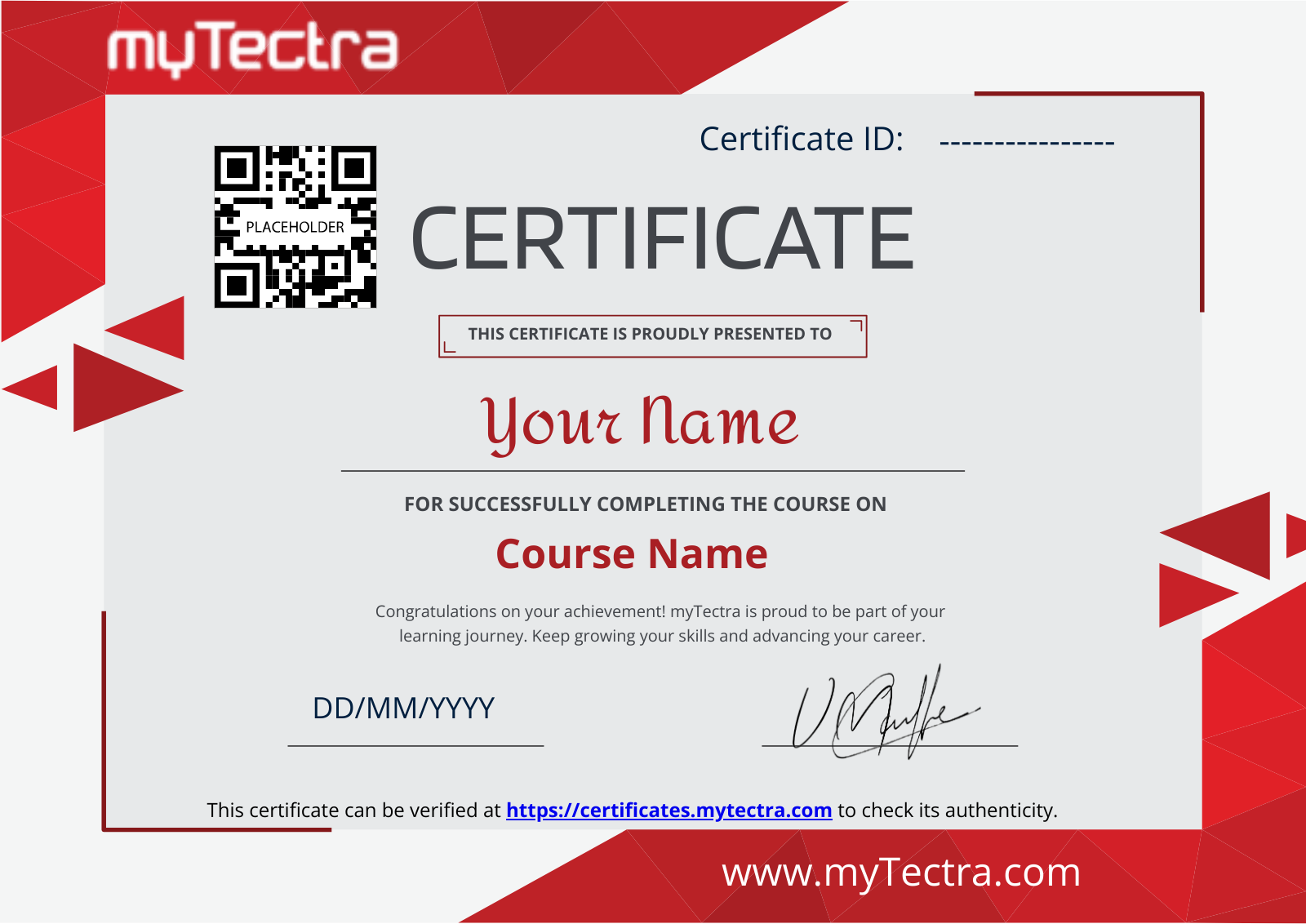
Certification

After completing the course and project, you will receive a recognized certification that validates your expertise and enhances your professional credentials in your chosen field.

Career Support

Access career support services after certification, including resume workshops, interview preparation, and job placement assistance. These resources equip you with the tools needed to transition successfully into the workforce.

Clients Testimonials

Hear what our students say about myTectra

“I did the Python & Django course in myTectra. myTectra also gave me the opportunity to work on a real-time project which helped me a lot to get my concept throw. myTectra also provided me the placement in the company for the course I did in mytectra.”
prinjal
Prinjal
Python
“I am from Robert Bosch and have taken up Python Flask corporate training from myTectra. I am very much satisfied and happy with this customized training. The tutor was extremely helpful and flexible and provided the best insightful training.”
princy
Princy
Python Flask
“I have done Java Full Stack developer course in myTectra. myTectra has supported me in all possible ways. I have excellent knowledge of the course. mytectra has given all practical knowledge with real-time problems and examples”
sunita
Sunitha
Java Full Stack Developer

Hear from Our Successful Learners!

Discover how myTectra transformed their careers—your success story could be next!

Course Features

Expert Trainers

Courses are delivered by experienced working professionals and subject matter experts with real-world experience.

Hands-On Training

We provide learners with practical experience through real-world scenarios, projects, and interactive exercises.

Customizable Corporate Training

Tailored training solutions designed to meet the specific needs of organizations and teams.

Certifications & Assistance

Certifications offered by myTectra align with international standards and we also help you to prepare for globally recognized certifications.

Global Recognition

Trusted by individuals and enterprises worldwide, with a track record of successful alumni and partnerships.

24 x 7 Expert Support

We have a 24x7 online support team to resolve all your technical queries, through a ticket-based tracking system, for a lifetime.

Gain prestigious credentials and recognition

mytectra-certificate


Global Accreditation
Recognized Credentials

Start Learning Today. Access Your Resources for a Lifetime!

Enjoy lifetime access to myTectra’s Learning Management System (LMS), including session recordings, study materials, and resources. This ensures continuous learning and easy reference to course content even after completion.

Lifetime Access
24/7 Assistance

Resume Preparation Made Professional and Impactful

Get expert guidance in crafting a professional and impactful resume. myTectra’s resume-building support helps highlight your strengths, certifications, and skills effectively, increasing your chances of landing your dream job.

Job-Ready Resume
Resume That Stands

Prepare for Success with Expert Mock Interviews

Prepare for real-world interviews with personalized mock interview sessions conducted by industry experts. Receive feedback on your performance, learn key interview techniques, and gain the confidence to succeed in job interviews.

Simulate Real Interviews
Boost Your Confidence

FAQs

How do I contact myTectra for Corporate Training?

Would you like to reach us for the training for your team? Please fill the below form. We will get back to as soon as possible.

Will I get placement assistance?

myTectra is providing 100% placement assistance on our key courses. We help you with the career counselling, Exams on Key courses, Mock Interviews and Technical Interviews Tips.

Landing an interview proves that you have the job-specific skills for the position, but how do your interview skills stack up? Also, Soft skills are often the most important factor in showing you're the best candidate for the job.

Hence we are conducting FREE TRAINING on Soft-Skills worth Rs-25, 000 to all myTectra students which will help you to attend the interviews with more confidence. 

What if I miss a class?

You will never miss a lecture at myTectra. You can choose either of the two options:

Classroom Training:

  • If you miss one or few classes we can give a backup class based on trainer and your convenient time. 
  • In case if you miss many classes, we can reschedule your class with upcoming batches or other running batches based on how many courses topics you have completed so far.

Live-Online Training:

  • View the recorded session of the class available in your LMS.
  • You can attend the missed session, in any other live batch.
Can I attend a demo session before enrollment?

Yes. We arrange a free demo for all the courses either in the Classroom or Live-Online demo. Please fill the demo request form below to schedule a free demo.

What if I have more queries?

Just give us a CALL at +918047112411 OR email at support@mytectra.com

What are the payment options?
Payments can be made using any of the following options and a receipt of the same will be issued to you automatically via email for both classroom training and Online training.
 
  • Visa Debit/Credit Card
  • American Express and Diners Club Card
  • Master Card
  • PayPal
  • Net Banking/Wire Transfer
  • UPI Payment such as Google Pay, PhonePe, Paytm
  • Cash/Cheque/DD ( Not for Online Training )
Where do the classes take place?

For Individual: 

Classroom Training - Bangalore

Live-Online Training - Globally 

For Corporates: 

Classroom Training - We deliver classroom training for corporate in more than 20 countries. Send us an Enquiry Now!

Online Training - Globally

* All of the classes are conducted live online. They are interactive sessions that enable you to ask questions and participate in discussions during class time. We do, however, provide recordings of each session you attend for your future reference.

Who are the Trainers?

Our Trainer’s are chosen not only for their knowledge and expertise but also for their real-time experience in the respective courses.

Back to top
Ready to Start

Master HubSpot Help Desk Administration & Automation Training at myTectra

Related Programs

HubSpot Admin & Technical
4k+ LearnersLearn more →
HubSpot Content Hub
4k+ LearnersLearn more →
HubSpot Marketing Hub
4k+ LearnersLearn more →
HubSpot Operations Hub
4k+ LearnersLearn more →
HubSpot Sales Hub
4k+ LearnersLearn more →

Career Services

subscribe-mytectra
placement-icons
Placement Assistance
job-portal-icon
Exclusive access to myTectra Job portal
mock-interview-icon
Mock Interview Preparation
linkedin-icon
Resume & LinkedIn Profile Building
soft-skill
Access to Soft Skill Enhancement
career-guidance-icon
One-on-one career guidance

Land Your Dream Job Like Our Alumni

Related Blogs

Expert Tips for Mastering HubSpot Help Desk Administration & Automation

Top 05 Corporate Training Companies in India 2026

Top 05 Corporate Training Companies in India 2026

May 15, 2026, 2:51:56 PM 5 min read
Everything You Need To Know About ELK Stack Training

Everything You Need To Know About ELK Stack Training

Mar 6, 2025, 1:48:44 PM 5 min read
Revolutionizing Automation: How Vision Control Systems Are Shaping the Future of Manufacturing

Revolutionizing Automation: How Vision Control Systems Are Shaping the Future of Manufacturing

Oct 15, 2024, 3:02:46 PM 5 min read

Find HubSpot Help Desk Administration & Automation Course in Other Cities

HubSpot Help Desk Administration & Automation Online Training

myTectra offers expert-led HubSpot Help Desk Administration & Automation Online Training with hands-on exercises, real-world projects, and industry-recognized certification.

HubSpot Help Desk Administration & Automation Certification Course

Build practical skills in help desk setup, ticket management, workflow automation, routing, SLAs, and reporting with myTectra’s certification-focused online course.

Advanced HubSpot Help Desk Automation Training Online

Master advanced help desk automation, ticket pipelines, team permissions, service analytics, customer feedback, and support process optimization.

Best HubSpot Help Desk Administration Online Course

Join myTectra’s comprehensive HubSpot Help Desk Administration Online Course featuring flexible learning, expert mentorship, practical assignments, and dedicated learner support.

HubSpot Help Desk Administration Training with Placement Assistance

Prepare for help desk administration and CRM support roles through practical projects, job-oriented training, interview guidance, and placement assistance from myTectra.

HubSpot Help Desk Administration & Automation Training in Bangalore

myTectra provides expert-led HubSpot Help Desk Administration & Automation Training in Bangalore and online, helping you streamline ticketing, automate support workflows, and improve service delivery.